
Merge PDFs on your Mac
Drop. Arrange.
Merge. Done.
Merge and combine PDF files on your Mac. PDF Parcel is a fast, native macOS app that arranges, extracts and removes pages, and never writes to your originals.

The store installs PDF Parcel and keeps it up to date, so there is no separate updater to look after. macOS opens it without a warning, because Apple reviews and signs what the store hands over.
macOS 15 or later · Apple silicon and Intel · 31 languages
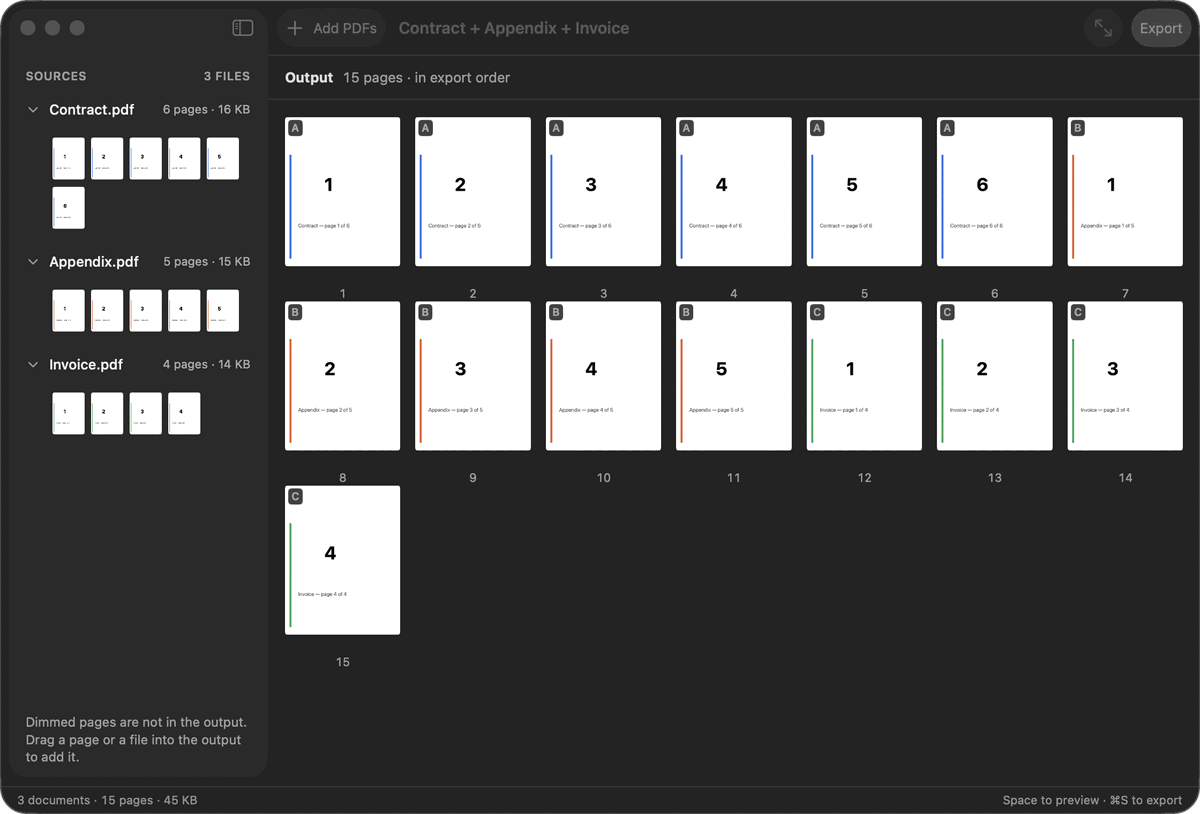
Three files in, one file out
Fifteen pages. One order. Yours.
alpha · bravo · charlie → One PDF
Merge PDFs without handing them over.
Built around local workflows. Your PDFs don’t need to be uploaded to a website just to perform basic PDF operations.
PDF Parcel covers exactly the workflow people actually use.
The usual way
With PDF Parcel
See how simple PDF work can be.
01
Drop
Drag your PDFs into PDF Parcel.
02
Arrange
Organize the documents exactly how you want them.
03
Export
Create your final PDF in seconds.
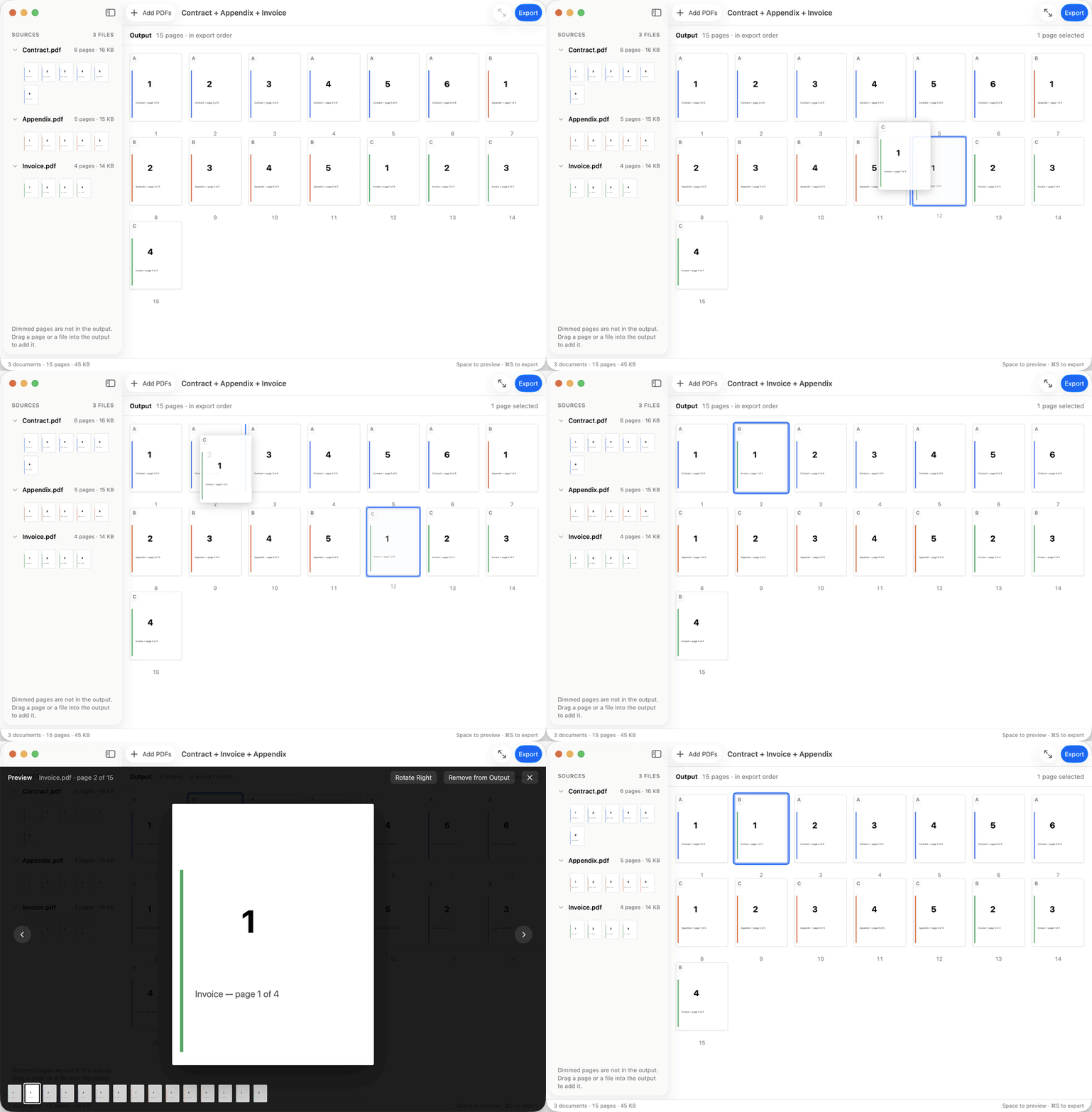
Sources → Output → Finished PDF
Everything the everyday work needs.
Four groups of capabilities, in the order you actually work through a document.
Organize
Drag & drop
Drag your PDFs into PDF Parcel.
Add images and text files as pages
Add a JPEG, PNG, HEIC, TIFF or GIF image and it becomes a page. Add a plain text, RTF or HTML file and it becomes as many pages as it needs, with text you can still select. Either way, you arrange and export those pages with the rest, as one PDF.
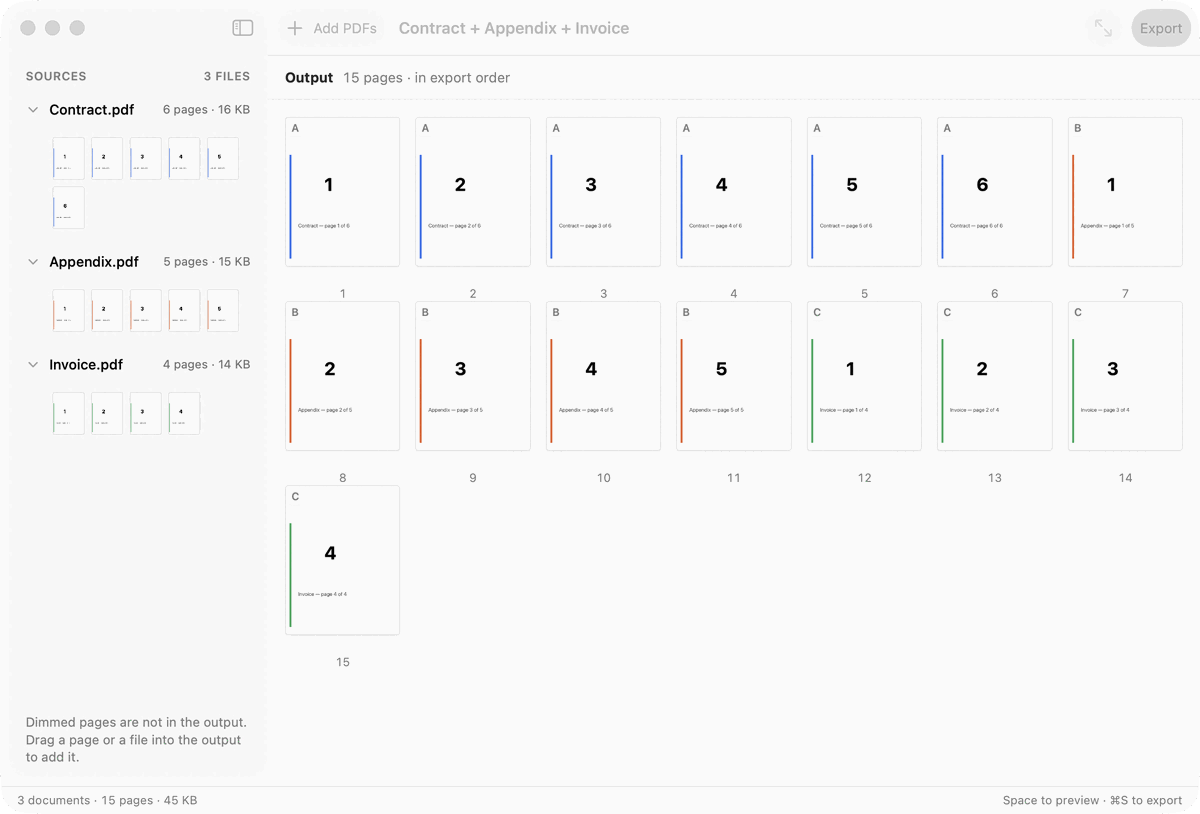
Sources and result side by side
Every file you added stays visible on the left while the result builds on the right.
Page thumbnails
See every page in export order before anything is written.
Reorder PDF pages
Drag a page to exactly where it belongs.
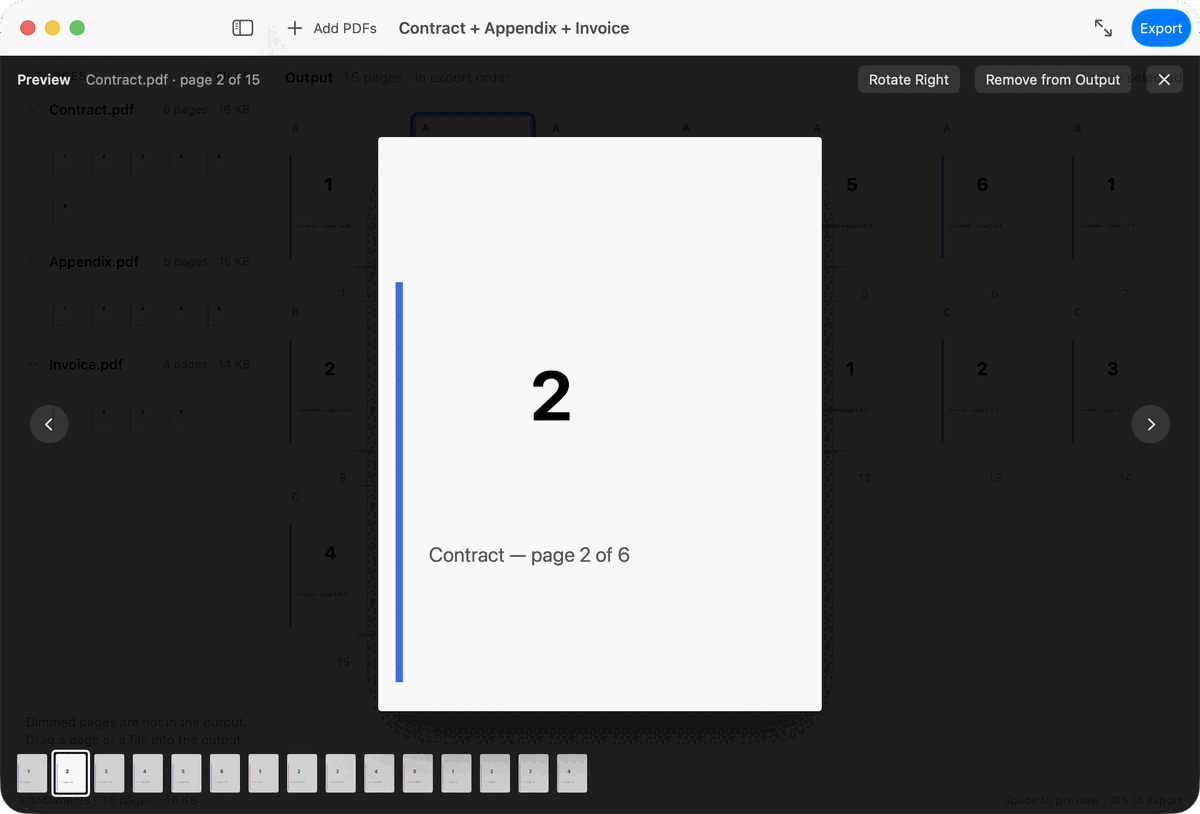
Quick preview
Space opens any page full size — just like Finder.
Edit
Delete PDF pages
Removed pages dim rather than vanish — drag them back any time.
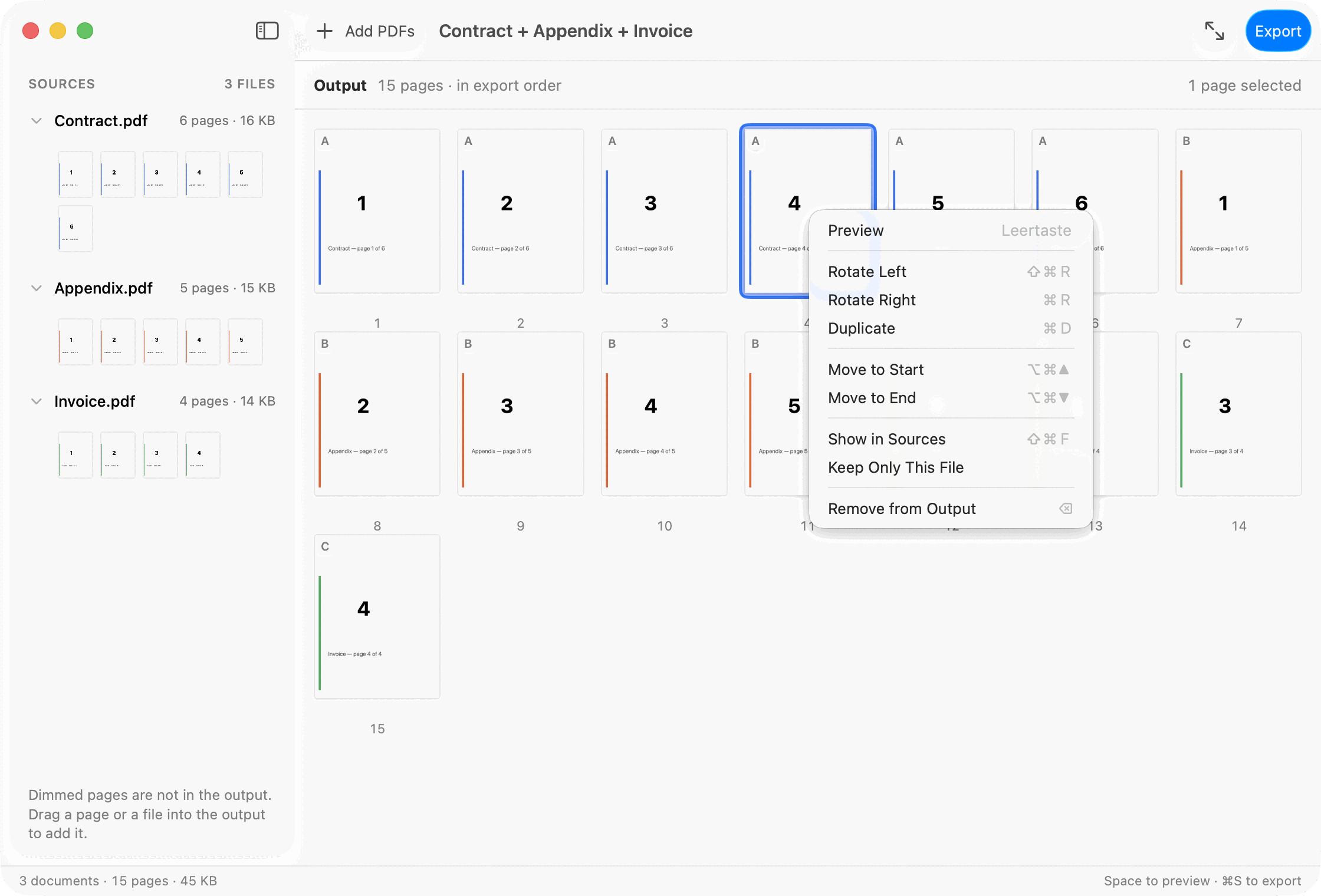
Rotate PDF pages
Correct the orientation of scanned or sideways pages.
Duplicate pages
Copies are labelled as copies, so the result stays readable.
Extract PDF pages
Select the pages you want in the output and export them as their own PDF, in the order you arranged them.
Control
Multi-select
Act on several pages at once instead of one at a time.
Undo & Redo
⌘Z and ⇧⌘Z on every edit. Nothing is final until you export.
Password-protected PDFs
Unlock protected documents with their password. PDF Parcel never bypasses document security.
Export
Merge PDFs in seconds
Combine multiple PDF documents into one clean file. Drag files into PDF Parcel, arrange them in the order you want, and create your final PDF.
Reduce PDF file size
Pick Balanced or Small Size on the export panel. The app re-encodes the images inside your PDF and leaves text and drawings alone — and it only saves the smaller version when it turned out smaller and validated. Scanned pages and photos compress most.
Validation
Re-opened and checked before it is handed over — its page count against what you assembled, and pages rendered back out of it. A file that fails is deleted rather than delivered.
Privacy
Your documents are your business.
PDF Parcel is designed to keep everyday PDF workflows local to your Mac. No unnecessary uploads. The one connection it makes is to the App Store, and only when you ask for it.
Files are opened through the macOS security scope: PDF Parcel can reach only the documents you hand it.
PDF Parcel
Browser-based tools
Made for your Mac. Not your browser.
No account
Your documents never leave your disk. Nothing is uploaded, and nothing is signed up for.
From the Mac App Store
Apple reviews and signs what the store hands over, so it opens normally. New versions arrive the same way.
Appearance
Light, Dark, or follow the system.
Keyboard-friendly interaction
Space to preview, ⌘Z to undo, ⌘E for a selection, ⌘S for the result.
Thirty-one languages
The interface speaks the language your Mac does.
Built for the documents you handle every day.
For Business
Combine reports, proposals, invoices and contracts.
Applications
Cover letter, CV and certificates as a single PDF.
For Students
Combine lecture notes, papers and research.
Legal
Case files and exhibits in the order the file is meant to be read.
Accounting
A year of receipts bundled into one file for the tax office.
For Home
Keep receipts, applications and important documents organized.
Two documents free. The third one is the subscription.
The limit counts documents, not pages. One 500-page PDF is free. Two documents of any size are free. Take one out and its place is open again. 2,000 pages in one workspace, and above 1,000 the app says so. A drop that would cross the ceiling is refused whole rather than trimmed to fit. The Mac App Store takes the payment and shows you the price for your own country, in that country's currency, before you buy; it also holds the renewal and the cancellation, and Restore Purchase brings the subscription to a second Mac.
Free
Gather up to two documents at a time, arrange their pages, and export. Every page tool, every keyboard shortcut, the same export.
Pro
The same app, without the limit on how many documents you gather at once. 2.99 USD per month, or 29.99 USD a year — a year works out under 2.50 USD a month.
Simple does not mean simplistic.
A short workflow still deserves careful handling. Every step is visible, reversible and checked before the file reaches your disk.
Questions, answered.
How do I merge PDF files on a Mac?
Drag the PDF files into PDF Parcel, put them in the order you want, and export. You get one new PDF in the folder you choose, and the files you started from are left exactly as they were.
Can I merge images or text files with my PDFs?
Yes. Add JPEG, PNG, HEIC, TIFF or GIF images, or plain text, RTF or HTML files, the same way you add a PDF. On your Mac, an image becomes a page with the picture on it, and a text, RTF or HTML file becomes pages whose text you can select. Any words inside a picture stay part of the picture. Each file you add counts as one document toward the free limit.
How do I get PDF Parcel?
From the Mac App Store. The store puts PDF Parcel on your Mac and keeps it current, so there is nothing to fetch by hand and no separate updater to look after. Because Apple reviews and signs what the store hands over, macOS opens it without a warning.
Are my PDFs uploaded to the cloud?
Merging, arranging and exporting are processed locally on your Mac. The app contacts the App Store when you open the Pro window, buy a subscription, or restore one — and at no other time.
Can I delete, rotate or extract PDF pages?
Yes, all three. Pages can be taken out of the result, rotated, duplicated and exported as their own PDF (⌘E). Every action is undoable with ⌘Z.
What macOS versions are supported?
macOS 15.0 or later, on Apple silicon and Intel.
Is it a replacement for a full PDF suite?
No, and it is not trying to be. PDF Parcel does not edit text inside a page, fill forms, sign documents or run OCR. It combines, arranges and prepares PDFs — and for that it is the faster tool.
PDFs, without the fuss.
Meet PDF Parcel — a simpler way to work with PDFs on Mac.
PDF Parcel comes from the Mac App Store. The store installs it, keeps it up to date, and shows you the price for your own country before you buy.
From the Mac App Store